Model-View-Controller Pattern
What is the MVC Pattern?
The MVC pattern is a software design pattern commonly used for developing web servers by handling different aspects of the application with different functions.
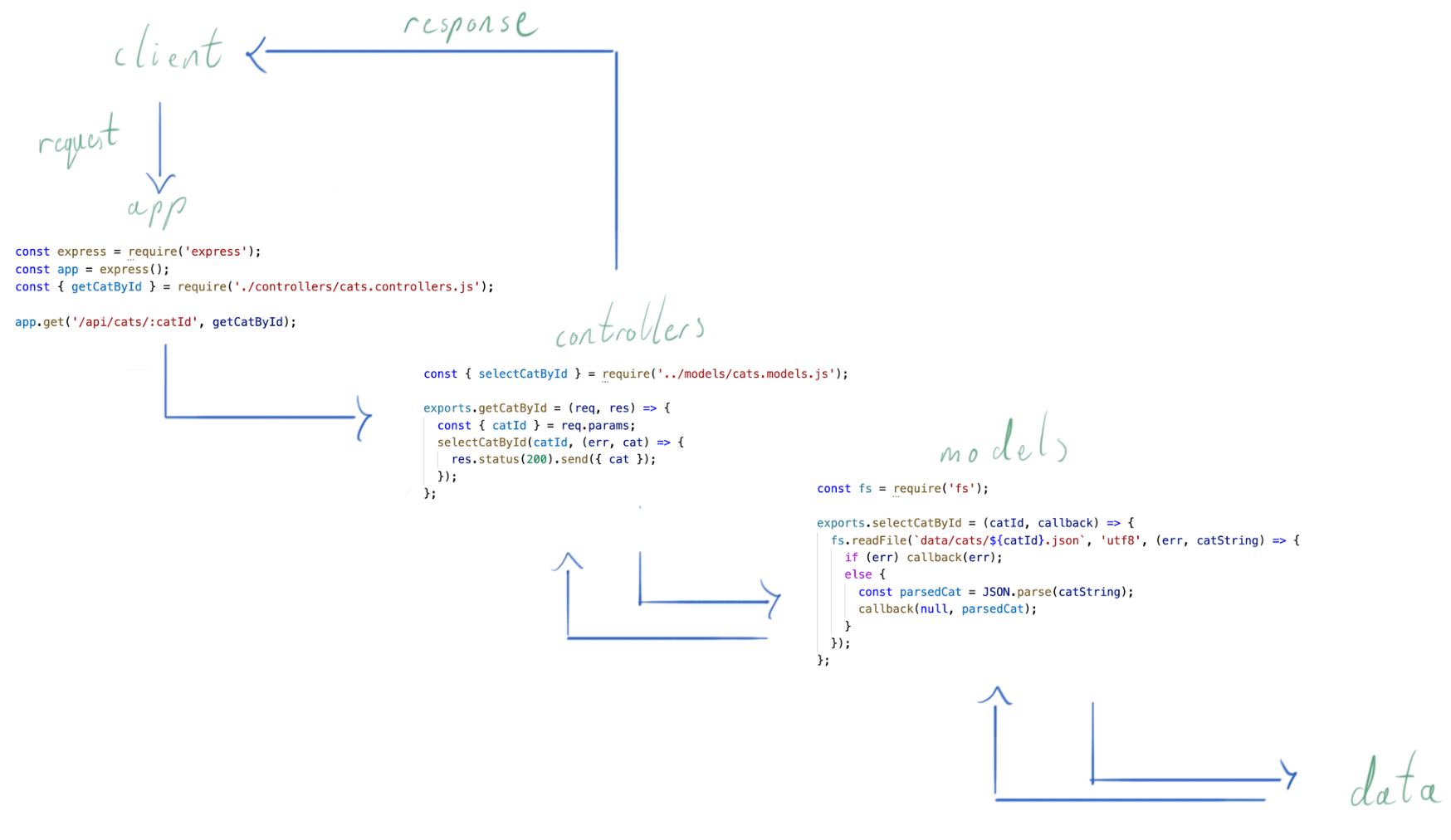
- Controller: Handles the client request, and using the information contained on the request (path, params, queries and body) will invoke the model which will interact with the dataset, and will then send a response to the client with the appropriate data.
- Model: Handles the fetching, updating, creating and deleting of data, and sends the data in the required format to the controller based on controller’s instructions.
- View: Displays data to user in easy-to-understand format, based on the user’s actions (We won't be dealing with views for a little while)
Why not write an entire server all in one function or a file?
As in the examples we have seen so far, our functions can become complex, and deeply nested when building a web server, whether with http, express or any other framework. In order to be able to clearly identify what is going on in the server and help debug errors, we can instead have all the logic abstracted away into separate functions. To do this consistently, we will be using the MVC (Model-View-Controller) pattern, splitting our code up into separate functions that are responsible for different things within our server as per the following examples:
// app.js
// - our server

app.get('/api/cats/:catId', getCatById);

// controllers.js
// - responsible for handling the request, invoking the model, and sending the response
exports.getCatById = (req, res) => {
  const { catId } = req.params;
  selectCatById(catId, (err, cat) => {
    res.status(200).send({ cat });
  });
};

// models.js
// - responsible for interacting with the data and sending data back to the controller (in this case using the callback parameter)
exports.selectCatById = (catId, callback) => {
  fs.readFile(`data/cats/${catId}.json`, 'utf8', (err, catString) => {
    if (err) callback(err);
    else {
      const parsedCat = JSON.parse(catString);
      callback(null, parsedCat);
    }
  });
};
Example using Promises:
// app.js
// - our server

app.get('/api/cats/:catId', getCatById);

// controllers.js
// - responsible for handling the request, invoking the model, and sending the response
exports.getCatById = (req, res) => {
  const { catId } = req.params;
  selectCatById(catId).then((cat) => {
    res.status(200).send({ cat });
  });
};

// models.js
// - responsible for interacting with the data and sending data back to the controller (in this case using return). It then catches any error and returns it by using a 'catch' block.
exports.selectCatById = (catId) => {
  return readFile(`data/cats/${catId}.json`, 'utf8').then((catString, err) => {
      const parsedCat = JSON.parse(catString);
      return parsedCat
    }).catch((err) => {
      return err
    })
  };;
note:
Make sure to require fs if using callbacks and fs/promises if using promises.
Project Structure
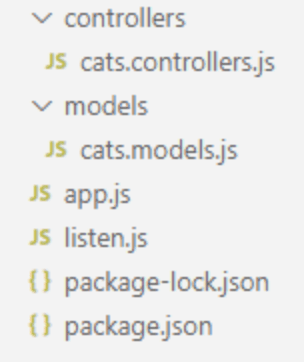
Now that we have an increasing number of functions to deal with we need a maintainable directory structure to store these files. Keeping each category of function (controllers / models) keeps them distinct and when we come to add more these directories can easily be added to.
Another helpful pattern can be to add an extension to the file name to help identify files of the same name. For example below we need both controllers and models for our cats resource so the files are named cats.controllers.js and cats.models.js to keep them distinct.
MVC Flow
When dealing with multiple files it can be helpful to visualise the flow of data through our servers. Below is an illustration .
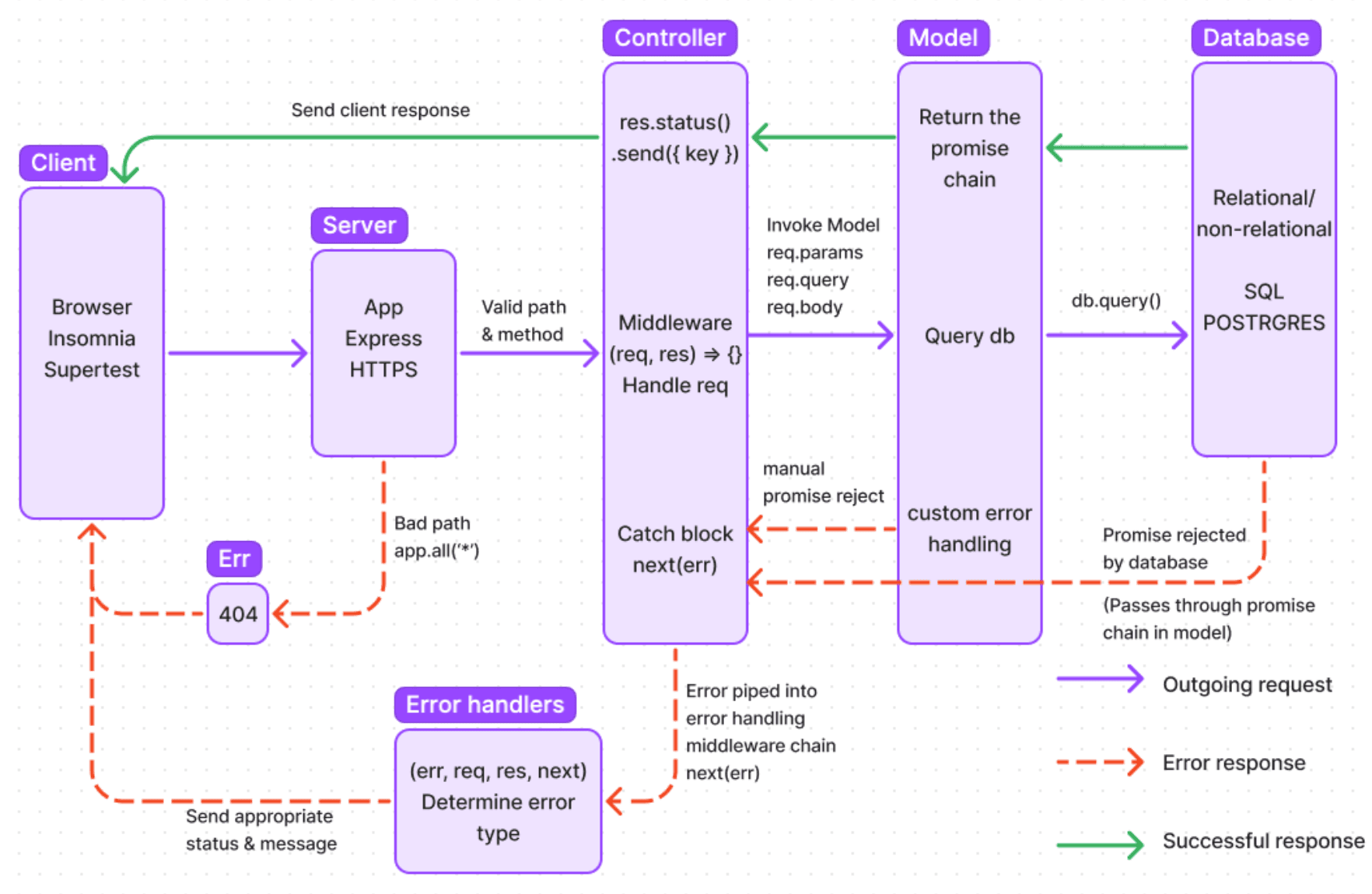
nb In the example below of a client making a request to our /api/cats/:catId endpoint, the controller invokes a single model but in more complicated endpoints the controller can make use of multiple models from different files in order the process the request.